 how-to
7 Steps to Check Used Car History Before Buying
Last Updated: October 25, 2026
Quick Summary
To check used car history, obtain the vehicle's 17-digit VIN, run a free VIN check through the National Insurance Crime Bureau or Kelley Blue Book, then order a paid vehicle history report from CARFAX or AutoCheck for around $25 to access accident records, title status, mileage history, and ownership information.
- The VIN is a 17-digit code found on the driver's side dashboard where it meets the windshield, door jamb, engine block, or insurance card.
- Free VIN checks reveal theft records and basic red flags but don't show accident history, title status, mileage records, or service history.
- CARFAX and AutoCheck reports cost around $25 and pull data from insurers, police reports, DMV records, and service shops.
- Title brands like salvage, rebuilt, flood, or odometer rollback are permanent flags that affect value, insurability, and resale.
- A professional pre-purchase inspection costs $100-$200 and should always be completed before buying, even from a dealer.
Table of Contents
- Why Checking Used Car History Matters Before You Buy
- Step 1: Locate the Vehicle Identification Number (VIN)
- Step 2: Run a Free VIN Check
- Step 3: Order a Vehicle History Report
- Step 4: Check Car Title History and Title Brands
- Step 5: Verify Mileage, Accidents, and Ownership Records
- Step 6: Use a Used Car Inspection Checklist
- Step 7: Schedule a Pre-Purchase Inspection and Review Your Findings
- Frequently Asked Questions
Why Checking Used Car History Matters Before You Buy
Before you buy a used car, you need to check used car history, it's like signing a contract you haven't read. A vehicle's past reveals accidents, flood or salvage damage, theft, owner count, and mileage accuracy.
The good news: checking used car history is free or cheap, and it takes less than an hour. The Federal Trade Commission advises consumers to use the National Motor Vehicle Title Information System (NMVTIS) for vehicle history.
Why this matters for you:
- Accidents damage more than just paint. Hidden structural problems cost thousands to fix later.
- A salvage or rebuilt title means the car was totaled once. Insurance companies won't cover it again.
- Odometer fraud is real. A car with 50,000 miles might actually have 150,000.
Here are seven steps to check used car history thoroughly.
Step 1: Locate the Vehicle Identification Number (VIN)
The VIN is your key to everything. This 17-digit code is unique to every vehicle and encodes its year, make, model, engine type, and manufacturing location.
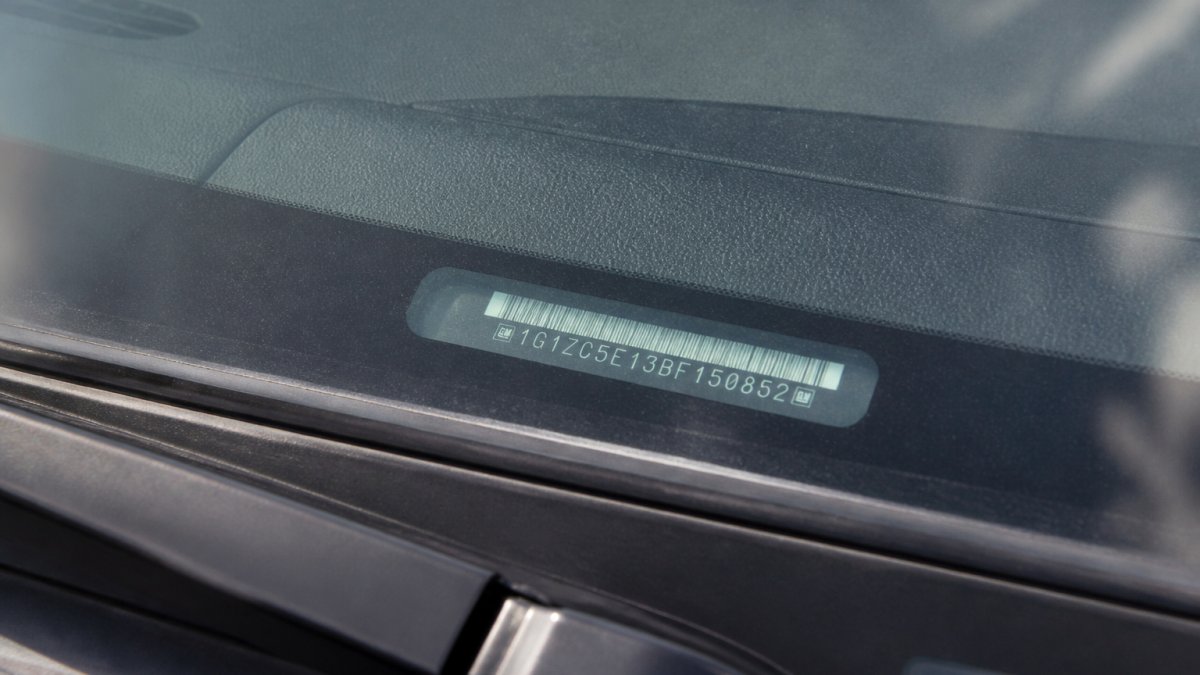
Write it down or take a photo. You'll need the exact number for every check, and it should match across the title, registration, and history reports.
Watch out: If the VIN on the dashboard doesn't match the VIN on the title or door jamb, walk away.
Step 2: Run a Free VIN Check
Before paying for anything, run a free VIN check to see whether digging deeper is worth your time.
The National Insurance Crime Bureau (NICB) offers VINCheck, a free tool that checks whether a vehicle was reported stolen and not recovered.
You can also check Kelley Blue Book's free vehicle history search, which shows how many records are in a full report.
What the free check shows:
- Theft records
- Number of records on file
- A preview of what a paid report contains
What it doesn't show:
- Accident history
- Title status
- Mileage records
Free checks are a starting point that filter out obviously problematic cars before you pay for a detailed report.
Free VIN checks reveal some red flags but have important limitations.
| What Free Checks Show | What They Don't Show |
|---|---|
| Theft records | Accident history |
| Number of records on file | Title status |
| Preview of paid report | Mileage records |
| Basic red flags | Service history |
Step 3: Order a Vehicle History Report
A paid vehicle history report gives you the full picture. The two major providers, CARFAX and AutoCheck, pull data from insurers, police reports, DMV records, and service shops.
CARFAX Vehicle History Reports cost around $25 for a single report, though prices vary. AutoCheck charges similar rates.
A good report includes:
- Accident and damage records
- Title history (clean, salvage, rebuilt, lemon law buyback)
- Mileage records from inspections and service
What to look for in the report:
- Any accident marked as "major" or "moderate"
- Title brands that indicate structural damage
- Gaps in mileage records
Order the report before negotiating price. If it shows problems, use it to ask for a lower price or walk away.
Step 4: Check Car Title History and Title Brands
Title brands are the single most important line in any vehicle history report.
The brands you will actually see, and what they mean in practice:
Salvage title: An insurer declared the vehicle a total loss, typically because repairs exceeded a large share of its pre-loss value.
Rebuilt or reconstructed title: The salvage vehicle was repaired and passed a state re-inspection.
Odometer rollback or mileage discrepancy brand: A state agency or reporting source flagged that the mileage doesn't add up.
How to interpret what you find:
- A clean title with no brands is the baseline. Confirm it matches the physical title and the VIN on the dashboard and door jamb.
- A single salvage or flood brand is a hard stop for most buyers; the discount rarely covers the risk.
- A rebuilt title can be acceptable if the price reflects it, the repair documentation is complete, and an independent inspection confirms the work. Confirm your insurer will cover it first.
Step 5: Verify Mileage, Accidents, and Ownership Records
Three data sets matter most: mileage readings over time, reported accidents and damage, and ownership transfers. Each has blind spots, so cross-check them against each other and the physical car and paperwork.
Mileage: read the sequence, not the number. A vehicle history report shows odometer readings captured at title transfers, inspections, service visits, and emissions tests. They should climb steadily and roughly match the car's age, about 12,000 to 15,000 miles per year is a rough guide, not a rule. What matters is the shape of the sequence:
- A reading that drops between records is a red flag for odometer rollback or a data-entry error. Ask for the source of each reading.
- A long gap with no readings, followed by a large jump, can mean the car sat unused, was off the road for repairs, or the records are incomplete. Ask what happened during the gap.
- Readings that cluster at suspiciously round numbers, or that barely move across several years, deserve scrutiny.
Odometer fraud is illegal under federal law, and digital odometers make rollback easier than it used to be. If the numbers don't reconcile, don't accept a verbal explanation, ask for service records, inspection stickers, or prior titles showing the mileage history.
Accidents: understand what is reported and what is not. Reports capture only accidents that generated a record: an insurance claim, a police report, a salvage auction, or a participating repair shop. A fender-bender paid out of pocket or a repair at a non-reporting shop can leave no trace, so a clean accident history is not proof of a clean car.
- Look at the severity labels. Minor and moderate damage is common and often repairable; major or severe damage suggests structural involvement.
- Check whether airbags deployed. Airbag deployment usually signals a harder impact and higher repair cost.
- Look for repeated accidents at the same corner or panel. That pattern can indicate a persistent alignment or structural issue.
Ownership: count transfers and look at the timing. Ownership history shows how many times the car changed hands and when. One or two owners over several years is normal; several transfers in a short period is worth questioning.
- Multiple owners in a short window can mean the car has a problem that keeps driving people to sell.
- A transfer shortly after a reported accident or repair can mean the owner fixed it to sell, or decided to cut losses.
- Commercial or fleet use is not automatically bad, but rental and fleet vehicles often see harder use and more drivers. Ask how the car was used.
Cross-check the three data sets against each other. The most useful signal is a conflict between sources. If the report shows an accident but the seller says the car was never hit, ask for the repair invoice. If the title mileage doesn't match the odometer, stop and investigate. If the ownership timeline overlaps with a salvage event, find out how the car was rebuilt and by whom.
What to do when something does not add up:
- Ask the seller for documentation: repair invoices, insurance records, prior titles, and service receipts.
- Arrange a pre-purchase inspection focused on the area of concern, such as frame damage, flood exposure, or transmission work.
- Use confirmed problems as negotiating leverage, or decline the purchase if the seller cannot explain the discrepancy.
- If you suspect odometer fraud or title washing, walk away and consider reporting it to your state motor vehicle agency.
Step 6: Use a Used Car Inspection Checklist
A history report is paper; a used car inspection is real. You need both, and a checklist keeps you organized.
Walk around the car and look for these things:
Exterior:
- Paint thickness consistent across panels (use a paint depth gauge or ask a technician)
- No rust or corrosion
- All lights work
- Tires have adequate tread
Interior:
- Seats and steering wheel show normal wear for the mileage
- All electronics work (windows, locks, air conditioning)
- No stains or odors that suggest water damage
- Dashboard lights function
Engine:
- Starts easily
- No unusual noises or vibrations
- Oil level is good
- Coolant is clean
Test drive:
- Brakes respond smoothly
- Steering is responsive
- No pulling to one side
- Transmission shifts smoothly
Take photos and notes. If something feels off, trust your gut. There are plenty of other cars.
Step 7: Schedule a Pre-Purchase Inspection and Review Your Findings
A technician will put the car on a lift, check the suspension, brakes, transmission, and engine.
What happens next:
- The technician gives you a detailed report
- You compare it to the history report
- You decide whether to negotiate, walk away, or buy
At PANEL CRAFT AUTO SALES LLC, we recommend always getting a pre-purchase inspection, even from a dealer.
Review the history report, your checklist, and the professional inspection together.
Questions to ask yourself:
- Does the car's condition match its price?
- Are the repairs needed worth the savings?
- Can I afford unexpected repairs if something breaks?
- Do I feel confident buying this car?
If you answer no to any of these, keep looking.
Checking a used car's history takes time, but it's the best protection against buying someone else's problem.
Frequently Asked Questions
Is there a free way to check a car's VIN?
Yes. The National Insurance Crime Bureau's VINCheck tool is free and checks whether a vehicle was reported stolen. The Federal Trade Commission recommends using the National Motor Vehicle Title Information System (NMVTIS) for a free vehicle history report covering title and insurance-loss information. Free VIN checks provide basic data, but paid vehicle history reports reveal more details about accidents, ownership, and service records.
What information does a vehicle history report include?
A vehicle history report typically includes title status, reported accidents and damage, airbag deployment records, odometer readings and mileage history, number of previous owners, registration and sales records, service and maintenance history, vehicle specifications, and recall information. The depth depends on whether you use a free or paid report. Paid reports from established providers include more comprehensive data from multiple sources.
How do I check whether a used car has a clean title?
Check the vehicle's title status through the National Motor Vehicle Title Information System (NMVTIS) or a paid vehicle history report. Look for title brands like 'salvage,' 'rebuilt,' or 'flooded.' A clean title means the vehicle was not declared a total loss by an insurance company. Request the title document from the seller and verify the VIN matches. If you see unfamiliar title brands or inconsistencies, ask the dealer or seller for clarification before proceeding.
What is title washing, and how can I spot it?
Title washing is when a seller moves a vehicle with a branded title (salvage, rebuilt, flooded) to another state to obtain a clean title without disclosing the vehicle's history. Spot it by checking the vehicle history report for title changes across states and comparing the reported title status with the current title document. Mileage inconsistencies and gaps in ownership records are also red flags. Always verify title history through NMVTIS or a paid report before buying.